Abandoned Cart Emails: The 9 Best Practices for 2026
Read summarized version with
Summary
- What it covers: the nine abandoned cart email practices worth keeping, the two that quietly cost you money, and how to set the sequence up.
- Why it matters: Baymard Institute puts the average cart abandonment rate at 70.22%, averaged across 50 separate studies (baymard.com, list last updated 22 September 2025).
- Takeaway: SmartrMail's default is three emails at 1 hour, 1 day and 3 days after the cart is abandoned. Start there and change the delays only with your own data.
Baymard Institute puts the average cart abandonment rate at 70.22%, averaged across 50 separate studies (baymard.com/lists/cart-abandonment-rate, list last updated 22 September 2025). Roughly seven carts in ten never become orders.
Most of them aren't lost on price. They're lost to a shipping cost that showed up at the last step, a forced account creation, or a shopper who opened six tabs and forgot which one had the thing they wanted.
An abandoned cart email sequence is the cheapest way to get a share of those back. This guide covers what to send, when to send it, and what SmartrMail sets up for you without you configuring anything.
We're not going to give you a recovery-rate number. The figure that used to sit in this article came from a source we can no longer open, so we cut it rather than repeat it.
What an abandoned cart email is, and what it is not
An abandoned cart email is an automated message that goes to someone who added a product to their cart and left without paying.
It fires off a trigger, not a schedule. There's no campaign to send, no list to pick. Once the automation is on, it runs on its own for every cart that qualifies.
Two things it is not:
It is not a browse abandonment email. Browse abandonment fires when someone looks at a product and never adds it to the cart. Different trigger, different intent, different copy. We've written that difference up separately in abandoned cart vs browse abandonment emails and in browse abandonment subject lines.
It is not something you can send to everyone. You need an email address on file, and whether you can use it depends on where the shopper is. In the EU and UK, email marketing needs consent, and an abandoned cart is marketing. In the US, CAN-SPAM doesn't require opt-in, but it does require a working unsubscribe link and your postal address in every email. Canada's CASL needs consent. SmartrMail keeps it simple by only sending abandoned cart emails to contacts who have opted in to marketing, whether at checkout or earlier.
SmartrMail's default timing: 1 hour, then 1 day, then 3 days
SmartrMail ships a pre-built abandoned cart automation. Out of the box, the delays are:
| Delay after the cart is abandoned | |
|---|---|
| 1 | 1 hour |
| 2 | 1 day |
| 3 | 3 days |
Method: shipped default of the pre-built abandoned cart automation in the SmartrMail app, as of September 2026. Not a benchmark, and not a claim about what performs best for your store.
You can change any of the three by clicking the Time Delay node and editing it on the left. Most stores don't, and that's fine. It's a defensible starting point: early enough to catch the people who simply forgot, spaced enough that three emails don't land in one afternoon.
The nine best practices, and the two most stores get wrong
The nine worth keeping
1. Send the first one inside the hour. The shopper still remembers the product. Wait a day and you're reintroducing yourself.
2. Don't discount in the first email. A share of cart abandoners were going to come back anyway. Discounting them on email one hands away margin you didn't need to spend, and it teaches repeat customers to abandon on purpose.
3. Show the actual products. Image, name, price. The email should look like the cart, not like a newsletter. SmartrMail's template pulls the abandoned items in automatically, images and titles included.
4. One call to action, pointing at the cart. Not the homepage, not the collection. On Shopify and Neto, SmartrMail links the button straight back to the shopper's own cart. On other platforms it goes to the product page.
5. Ask what went wrong, and read the replies. A good share of abandonment is a checkout that broke. Most people won't tell you unless you ask. Put a real reply-to address in the first email.
6. Put the incentive in email two. Free shipping does more work than a percentage discount here, because surprise shipping costs are one of the most common reasons carts get left behind in the first place. If you already offer free shipping, say so plainly and use a small discount instead.
7. Save your best offer for email three. By the third message you're talking to price-sensitive shoppers. If a discount is going to move them, it needs to be bigger than the one that didn't.
8. Stop at three. One email gets missed. Two gives you no room to change the offer. Four or more reads as pressure and costs you unsubscribes.
9. Let the sequence exit itself. When the cart converts, the remaining emails should not send. SmartrMail drops the recipient out of the automation as soon as the purchase completes, whether or not they opened anything.
The two most stores get wrong
Discounting on email one. Covered above, and worth repeating because it's the most common mistake in this sequence. You pay for conversions you were getting for free.
Scarcity you can't back. "Only 2 left" when there are forty in the warehouse. "Offer ends tonight" on an offer that never ends. It works until a shopper checks, and then it costs you the thing the sequence is for. If your stock genuinely is low, say so and pull the number from your inventory. If it isn't, write something else.
The three emails, and what belongs in each
Email 1: the reminder
No offer. The job is to bring the tab back.
Include the products, a button to the cart, and a line inviting a reply if something went wrong at checkout. Keep the subject line specific to what they left. Personalizing with the first product's name is a cheap way to make it recognizable in a crowded inbox.
If you want to see how other stores word this, we've collected seven abandoned cart emails worth learning from. And if the layout is what you're stuck on, the abandoned cart email template design tips piece goes deeper than this one does.
Email 2: the small offer
Free shipping, or a modest discount if shipping is already free.
This is also where the tone can shift slightly. Not into urgency theatre, just into "here's a reason to finish now rather than later."
Send it about a day after the first, per the default. Firing it two hours later reads as pestering, and plenty of people don't check email hourly.
Email 3: the last offer
The biggest discount you're willing to carry, on a code you can actually honor.
Two things earn their place in this email. A coupon code, which makes the offer feel specific rather than generic. And product recommendations at the bottom, which catch the shoppers who already bought the original item elsewhere and are no longer interested in it. SmartrMail adds recommendations with one toggle.
Leave 12 to 24 hours between email two and email three so the second offer has had a chance to be seen.
Setting the three emails up on Shopify
Four steps, and none of them need code.
1. Open Automations and pick the pre-built abandoned cart flow. It's at the bottom of the list.

2. Check the delays. You'll see the three-email sequence already spaced at 1 hour, 1 day and 3 days. Click a Time Delay node to change it. You can add or remove emails by dragging, though there's rarely a reason to. The automations overview in our docs covers the editor in more detail.
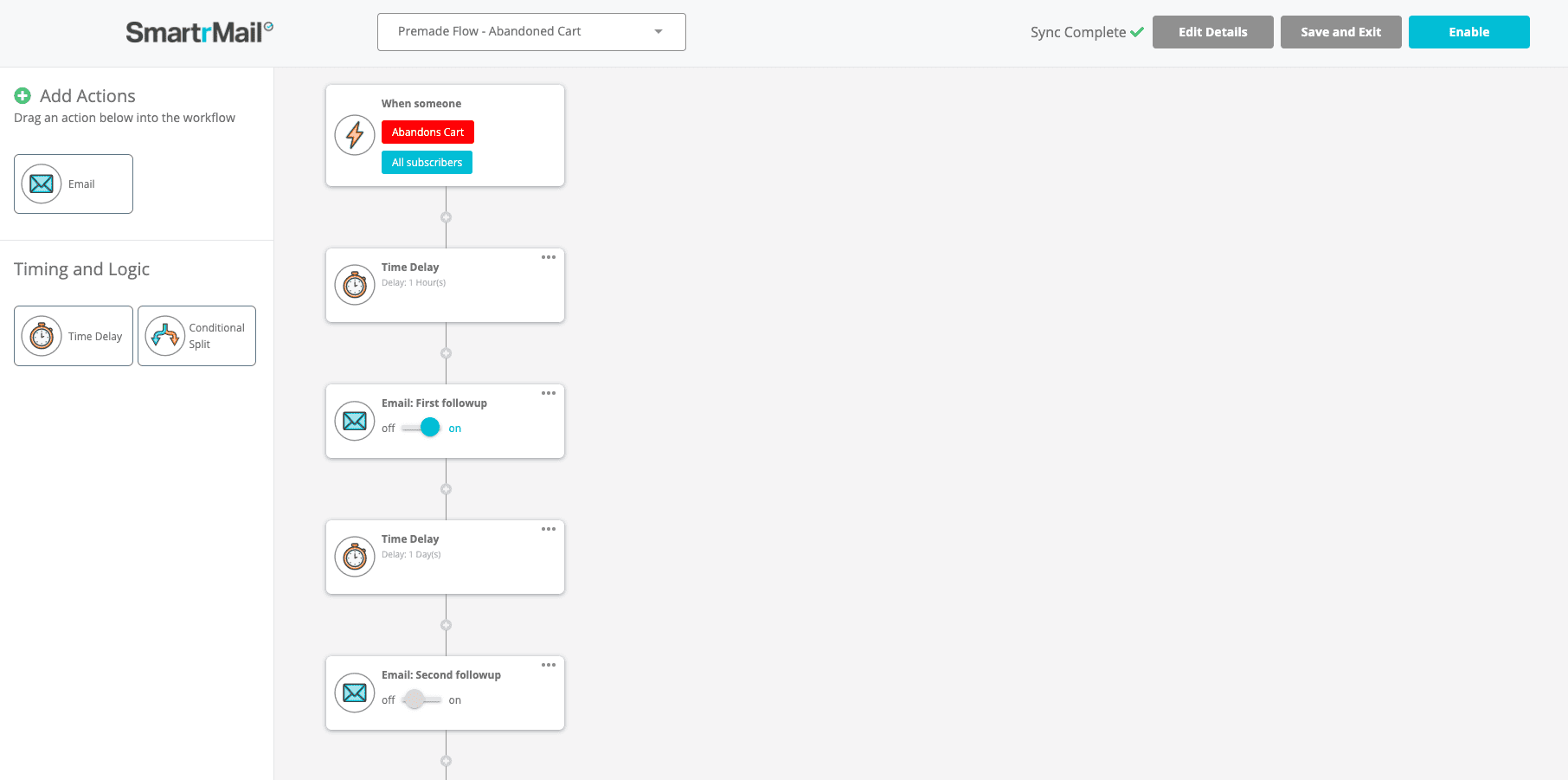
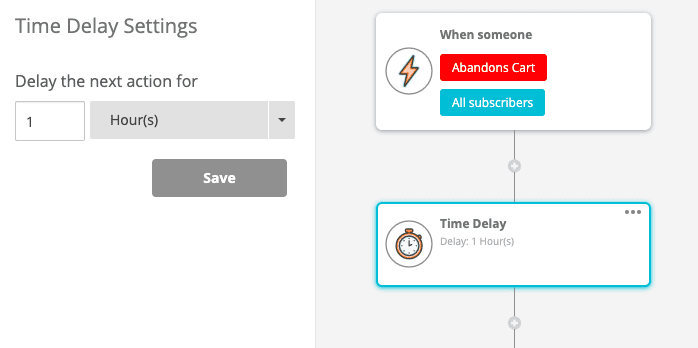
3. Customize the emails, or don't. All three are ready to send as-is. If you want to add a coupon code to emails two and three, click the email and then Edit. Merge fields like {{name}} and {{first_product}} are already in the template, and the full list is in our docs.
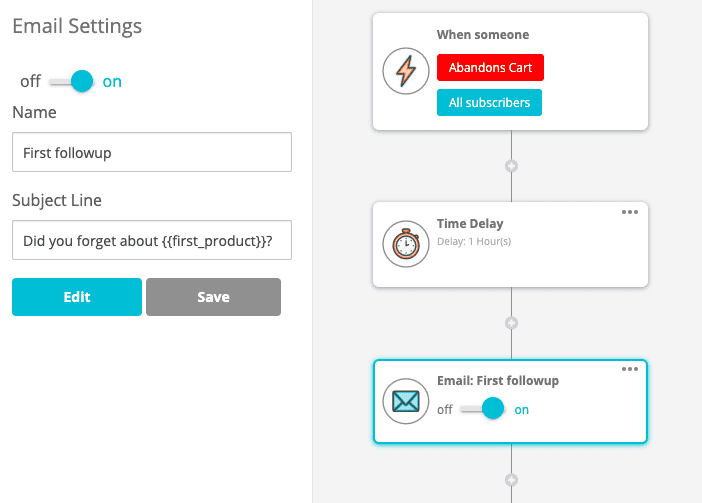
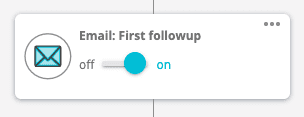
4. Switch each email on, then hit Enable. Both steps are needed. An automation can be enabled with individual emails still off.

SmartrMail connects to Shopify, BigCommerce, WooCommerce and Neto. The cart-level deep link in step 4 of the practices list works on Shopify and Neto.
What to check in Klaviyo, Omnisend or SmartrMail
The three-email structure isn't unique to us, and this section isn't going to tell you we recover more carts than anyone else. We don't have data that would let us say that honestly.
What's worth knowing is which questions to ask of whichever tool you're using, because the answers differ and they change what your sequence can do:
- What are the default delays, and can you edit each one independently? SmartrMail's are 1 hour, 1 day and 3 days, all editable (as of September 2026). Klaviyo's first delay is 4 hours.
- Does the button link to the shopper's own cart, or to the product page? This is a platform-level capability, not a design choice. It's the single biggest difference in how well the first email converts.
- Does the flow exit on purchase, or on a timer? Exiting on purchase is what stops a customer getting a 15%-off code the day after they paid full price.
- Are abandoned cart sends metered separately from campaign sends? On usage-based pricing this decides what the automation actually costs you at volume. SmartrMail's plans are here.
- Who is eligible to receive them? Consent rules are the same everywhere, but what each tool counts as consent isn't always the same.
Where the SmartrMail default sits against the market. In an analysis of 1,000 direct-to-consumer brands, 40% send the first abandoned cart email within the hour, a 30-minute send is what converts best, and the first three days after abandonment are the most valuable recovery window (Rejoiner, 2025; as of September 2026). That is where SmartrMail's default already sits: 1 hour, 1 day, 3 days. Klaviyo's pre-built flow waits 4 hours for the first email (Klaviyo Help Center, as of September 2026), and by then a share of the shoppers who simply forgot have moved on. For considered, high-ticket purchases a later first email can do better; that's what the editable delay is for.
Questions merchants ask
How many abandoned cart emails should you send?
Three. One gets missed. Two gives you no room to change the offer. Four or more reads as pressure and costs you unsubscribes. That's why SmartrMail's automation ships with three.
Are abandoned cart emails legal?
Yes, when they follow the email rules of the shopper's country: consent in the EU, UK and Canada; unsubscribe link and postal address in the US under CAN-SPAM. SmartrMail only sends them to contacts who've opted in to marketing, so the sequence stays inside the stricter rule everywhere.
What's a good abandoned cart email sequence?
Three emails: a reminder with no offer at 1 hour, a small offer (free shipping or a modest discount) at 1 day, and your best offer with a coupon code at 3 days. If the cart converts along the way, the rest doesn't send.
Will the button take them back to their exact cart?
On Shopify and Neto, yes. On other platforms the button goes to the product listing page instead.
How long does setup take?
Under an hour if you use the pre-built automation as it ships. Longer if you want to rewrite the copy and build a coupon code, which is worth doing.
Set the sequence up in SmartrMail. The abandoned cart automation is pre-built on every plan, including the free one. See plans and start. The free plan covers up to 200 active subscribers at $0/month, and the 15-day trial of Pro doesn't ask for a card (smartrmail.com/pricing, as of September 2026).
Launch your next campaign in a flash
15 days free. Then free forever up to 200 active subscribers. Cancel anytime, no questions asked.
You might also like
Unlock the secrets to thriving in the e-commerce world with expert insights, growth tactics, designs, templates, and much more to drive sales for your online store.